4 active Lunanode.com to compare
Claim Your $10 Free Cloud Credit
Newly registered Canadian and U.S. customerscan grab $10 in free credit to test our cloud services. A quick credit card validation is needed, but y...
Click to copy & open the website
Score $20 Credit on $10 Deposit
Boost your cloud hosting budget today. Deposit $10 into your LunaNode account and receive a free $20 promotionalcredit to use toward any of their r...
Click to copy & open the website

About LunaNode
https://www.lunanode.comLunaNode Cloud Hosting Overview
This quick-reference panel provides a convenient snapshot of active promotions for LunaNode, including the latest credit offers and hourly pricing details. Our editors update these listings regularly, with the most recent changesverified on 19/06/2026. Use this summary to compare virtual machine features, check the current live offer count, and find direct paths to save on your nextToronto cloud infrastructure deployment with ease today.Promotion summary
- Running: 4
- Best promotion: from $10
- Try it: Claim Your $10 Free Cloud Credit
- Category: VPS Hosting
- Last updated: 19/06/2026
Scalable SSD VPS From$0.0069 Hourly
Get reliable SSD VPS hosting on LunaNode starting at just $0.0069 per hour. Scale up to 32GB RAM to power your projects with high-performance resou...
Click to visit the website
Scale SSD VPS From $0.0063 Per Hour
Experience reliable SSD VPS hosting fromLunaNode starting at just $0.0063 per hour. Deploy virtual servers with up to 16GB RAMto power your applica...
Click to visit the website
How to get promotions from LunaNode
Review the active offers on our listing page and select the promotion that best matches your planned cloud infrastructure deployment.
- Copy the active coupon code from our listing pageand navigate directly to the billing or deposit section within your account dashboard.
- Enter the copied code into the designated promotional field before submitting your initial deposit orfinalizing your virtual machine configuration.
- Verify that the promotional credit or discount is visible in your account balance before launching your first active cloud server.
What to do when a LunaNode offer cannot be applied
If a promotional credit does not appear in your account balance, follow these simple verification steps to resolve the issue quickly.
- Check the specific eligibility requirements on our listing page to confirm if the offer is restricted to new accounts or requires a minimum deposit.
- Ensure the coupon code wasentered exactly as shown on our page, paying close attention to capitalization and removing any accidental spaces.
- Contact the provider support team directly if the system rejects avalid code, as they can manually verify your account status and apply eligible credits.
Current LunaNode offers worth comparing
Use this summary table to compare the main offers services from LunaNode. The table includes 4 active offers, highlights offers related to VPS Hosting if any, and shows the current best price of Great price: from $10, along with the latest offer: Claim Your $10 Free Cloud Credit.
| Promotion | Offer details | Code type |
|---|---|---|
| Just $10 | Claim Your $10 Free Cloud Credit | Coupon |
| Just $20 | Score $20 Credit on $10 Deposit | Coupon |
| From $0.00 | Scalable SSD VPS From$0.0069 Hourly | Services |
| From $0.00 | Scale SSD VPS From $0.0063 Per Hour | Services |
LunaNode Savings Guide for VPS Hosting
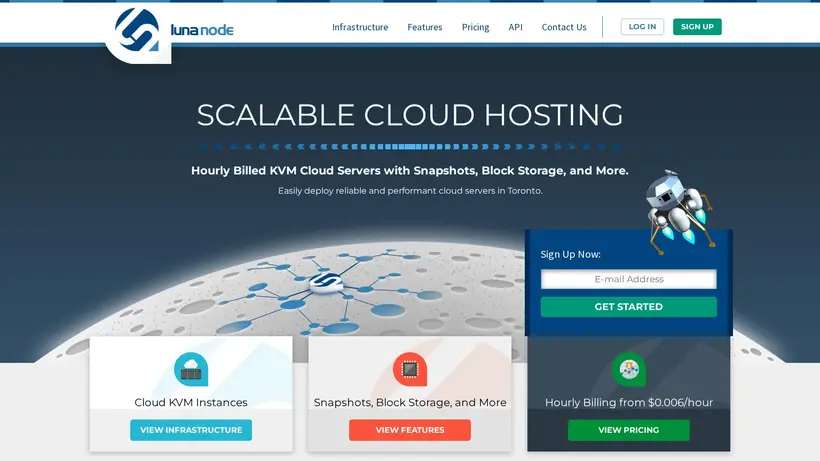
Deploying cloud infrastructure requires balancing performance needs with budget constraints.When setting up virtual machines, developers often face the challenge of predicting monthly costs due to fluctuating resource usage. Our editors track the latest promotions for LunaNode to help you optimize your cloud spend. The provider offers hourly billed KVM cloud servers in Toronto, featuring SSD disk arrays, live snapshots, and high-availability block storage. By utilizing our curated listings, you can find opportunities to secure promotional credits or loweryour initial deposit requirements before launching your next instance. Navigating these options carefully ensures you do not overpay for compute power that yourapplication does not actively utilize during its initial setup phase.
Before committing to a specific virtual machine size, it is helpful to evaluate how the billingstructure aligns with your project timeline. Hourly billing starting at fractions of a cent allows for highly flexible development environments, but costs can accumulate if instances are left running unnecessarily. We recommend reviewing the active offers on our page to see if a credit promotion is available for new accounts. This can provide a low-risk way to test their infrastructure features, such as cloud firewalls and private networks, without a large upfront financial commitment.Taking the time to plan your resource allocation before deploying your first virtual machine can lead to significant long-term savings on your overall cloud hosting budget.
How to maximize value on KVM cloud servers
When configuring your virtual machine, consider starting with a smaller plan, such as the 1 GB RAM configuration,and scaling up as your resource demands grow. The provider allows you to take live snapshots of your VM at any time to capturethe disk state for backups or cloning without experiencing downtime. This feature is particularly useful when testing new software configurations; you can capture a stable state, apply updates,and quickly roll back if something goes wrong. By combining these built-in infrastructure features with our listed promotions, you can minimize waste and ensure you only pay for the exactresources your application requires. Managing your snapshots efficiently also prevents unnecessary storage costs from accumulating on your billing statement over time.
Another key area for potential savings isbandwidth pooling. If you run multiple virtual machines in the same region, they can share unused bandwidth, which helps prevent overage charges on individual active instances. Additionally, block storage volumes can be detached and reattached as needed, allowing you to store data flexibly without paying for high-tier virtual machines justto get extra disk space. Reviewing these technical options alongside our Claim Your $10 Free Cloud Credit listing ensures you set up a cost-effective environmentfrom day one. Utilizing startup scripts to automate configuration during the boot process can also save valuable development hours, further increasing the overall value of your deployment.
When to compare plan options before checkout
Cart-total anxiety often hits right at the payment screen, especially when configuring cloud resources where add-onscan quietly increase the final price. Before you complete your registration, take a moment to compare the available promotions against your planned usage. For instance, if a promotionrequires a minimum deposit, calculate whether your projected hourly usage over the next few months will naturally meet that threshold. Choosing the right entry point prevents you from depositing morecapital than your project actually needs, keeping your cash flow flexible for other development tools. It is always best to double-check the billing terms toconfirm if the promotional rates apply to all virtual machine configurations or only to specific SSD VPS tiers.
It is also wise toverify the specific terms of any promotional credits you receive. Some credits may have expiration dates, such as a sixty-day limit, whichmeans you should plan your heaviest testing or deployment phases to occur immediately after account creation. By aligning your development schedule with the promotional terms listed on our page, you avoid letting valuable credits expire unused.Always check the final checkout details to ensure any applied coupon code or promotional link has registered correctly before finalizing your payment details. Taking these precautionary steps helps prevent unexpected chargesand ensures a smooth onboarding experience as you build out your cloud infrastructure.
Frequently asked questions about LunaNode
Finding the right cloud hosting resourcescan raise several questions about billing, features, and promotional offers. Our editors have compiled the most common inquiries regarding virtual machine deployments and account credits tohelp you make informed decisions. We monitor active listings to ensure you have access to the latest details on hourly billing, SSD storage options, andsetup requirements. Review the answers below to learn more about managing your cloud infrastructure costs and applying promotional offers effectively at checkout.
How does hourly billing work?
Are snapshots included for free?
Can I pool my bandwidth?
What is the minimum deposit?