5 active Seedvps.com to compare
Save 11% Lifetime On Windows VPS
Unlock permanent savings with SeedVPS.com. Grab an exclusive 11% lifetime discount on every Windows VPS plan available. Experience high-performance...
Click to copy & open the website
Save 10% Foreveron VPS Hosting
Grab an exclusive 10% recurring discount on all VPS hosting plans at SeedVPS.com.Keep your hosting budget predictable with steady, ongoing savings ...
Click to copy & open the website

About SeedVPS
https://www.seedvps.comSeedVPS VPS Hosting Quick Reference
This quick-reference panel displays the latest promotions for SeedVPS, including recurring lifetime discounts on Windows and SSD KVM hosting plans. Our editors update these listings regularly to reflect active deals, starting rates, and verified codes from the Netherlands-based provider. Review the current count and check the last updated date before visiting the checkout page to ensure you secure the best savings on your server deployment.Promotion summary
- Running: 5
- Best promotion: 11% off
- Try it: Save 11% Lifetime On Windows VPS
- Category: VPS Hosting
- Last updated: 21/06/2026
Windows VPS Hosting From €16.00
Get high-performance Windows VPS hostingfrom SeedVPS starting at only €16.00. Scale your projects easily with up to 8GB RAM and enjoyreliable, budg...
Click to visit the website
High Performance SSD VPS €9 Monthly
Deploy robust SSD KVM VPS powerwith 2GB RAM and 2x Intel E5 vCPUs. Includes 20GB RAID10 storage, 2TB outbound bandwidth, 1Gbps uplink, plus IPv4 an...
Click to visit the website
Fast SSD KVM VPS From €9/mo
Supercharge your projects with SeedVPS SSD KVM VPS hosting. Get up to 8GB RAM and 8 CPU cores for maximum performance. Plans start at just €9 per m...
Click to visit the website
How to use SeedVPS coupons
Follow these simple steps to apply your promotional discount successfully when configuring your new virtual private server on the billing platform at SeedVPS.com.
- Copy the active code from our listing page and navigate directly to the configuration screen for your chosen SSD or storage VPS plan.
- Enter your operating system and resource preferences, then locate the promotional code input field on the final checkout page before payment.
- Paste the copied code into the designated field and click validate to ensure the discount is applied correctly to your total invoice.
What to do when a SeedVPS coupon does not work
If your promotional discount does not apply correctly at checkout, use these troubleshooting steps to resolve the billing issue quickly and avoid full-price charges.
- Check the spelling of the code to ensure it matches our listing exactly, paying close attention to capitalized letters, numbers, and hyphens in the sequence.
- Confirm that your selected virtual private server plan matches the specific operating system, billing cycle, or resource requirements outlined in the promotion details on our page.
- Contact the customer support team via ticket or email if the billing system rejects a valid code that should apply to your chosen configuration and plan tier.
Current SeedVPS coupons worth comparing
Use this summary table to compare the main coupons services from SeedVPS.com. The table includes 5 active offers, highlights offers related to VPS Hosting if any, and shows the current best verified discount of 11% off, along with the latest coupon: Save 11% Lifetime On Windows VPS.
| Promotion | Offer details | Code type |
|---|---|---|
| 11% Off | Save 11% Lifetime On Windows VPS | Coupon |
| 10% Off | Save 10% Foreveron VPS Hosting | Coupon |
| From €16.00 | Windows VPS Hosting From €16.00 | Services |
| Just €9 | High Performance SSD VPS €9 Monthly | Services |
| From €9 | Fast SSD KVM VPS From €9/mo | Services |
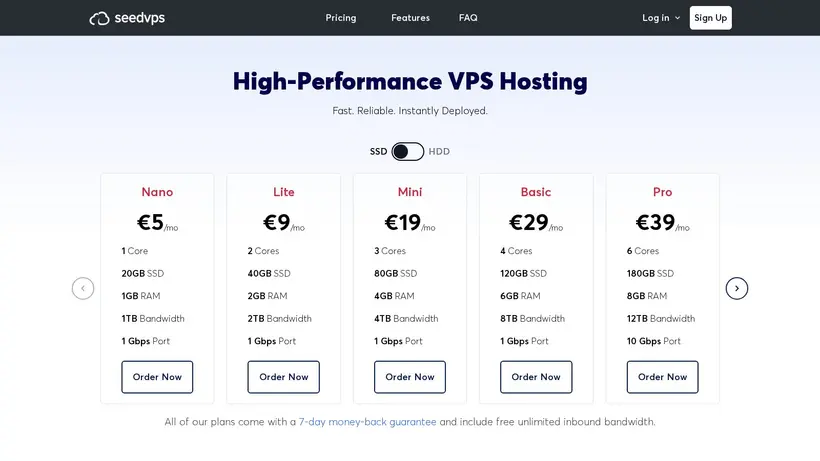
SeedVPS VPS Selection Guide for VPS Hosting
Choosing the right virtual private server means matching your workload to the correct CPU, memory, and storage tier. Our editors monitor active listings for SeedVPS to help you find reliable KVM-based hosting in the Netherlands. The provider builds their own nodes using Intel Xeon processors, NVMe data center SSDs or enterprise HDDs, and ECC memory modules to ensure data safety during intensive operations. Promotions on our page range from flat percentage discounts to recurring lifetime savings that apply to every billing cycle. Understanding these differences helps you avoid surprise renewal invoices and keeps your hosting budget predictable. Shoppers often pause at checkout when they realize a discount only applies to the first term, so verifying whether a promotion recurs is a crucial first step before copying any code.
Before selecting a plan, consider whether your application demands high IOPS for databases and real-time processing or larger capacity for backups and media archives. The crawled source indicates that SSD VPS plans deliver faster performance ideal for websites, apps, and databases, while Storage VPS options provide more space per euro for archival workloads. Custom configurations can scale beyond the listed tiers, reaching 40 cores, 128GB RAM, and 30TB storage when your project outgrows standard offerings. Taking time to match your technical requirements to the correct tier prevents overpaying for unused resources or running into capacity limits during traffic spikes. Our listing page updates regularly to reflect new promotions, allowing you to compare options before visiting the checkout page and ensuring you select a plan that aligns with both your performance needs and budget constraints.
How recurring discounts in our Save 11% Lifetime On Windows VPS listing work
When you review our listing for a Save 11% Lifetime On Windows VPS, it is important to understand how lifetime discounts function across renewal cycles. A recurring promotion, such as the 11% lifetime discount on Windows VPS plans, applies to every billing term, keeping your long-term hosting costs stable and predictable. In contrast, standard promotional rates might only reduce the first invoice, after which regular pricing resumes. Shoppers often experience cart-total anxiety when they see a low initial price jump upon renewal, so verifying the discount type on our page is a crucial first step. This distinction can save you significant money over several years of hosting, especially if you plan to run production workloads that require consistent uptime and budget forecasting. Our editors highlight these details to ensure you are never surprised by renewal invoices or unexpected price increases.
Additionally, check the operating system requirements for each promotion. Some listings target Windows VPS hosting starting at specific price points, while others apply to SSD KVM VPS plans running Linux distributions. The provider hosts its infrastructure on custom-built nodes featuring Intel Xeon Gold CPUs and NVMe data center SSDs in Amsterdam, connected to multiple Tier-1 carriers via 10 Gbps uplinks. Choosing the correct template during setup ensures the promotion applies correctly to your chosen environment without requiring manual adjustments later. If you select the wrong operating system, the discount code might fail to apply at checkout, causing deployment delays and billing complications. Taking a moment to verify compatibility prevents these issues and ensures that your server performs optimally from the very first second it goes online, whether you are hosting a web application, running a database cluster, or deploying a development environment.
When to pause and compare the 11% off before checkout
Before you copy the coupon code, take a moment to review the final checkout screen and confirm that the discount applies correctly to your selected configuration. The billing system at seedvps.com features a specific promo code field where you can input codes like WEBSITEPLANET11 or DH-10. Applying the 11% off should immediately update the total due, reflecting the percentage reduction on your chosen plan. If the price does not change, verify that your cart meets the eligibility criteria, such as a specific RAM configuration, billing cycle, or operating system template. A quick pause at this stage prevents accidental payments at full price and gives you time to troubleshoot any issues before entering your payment details. Our team recommends taking a screenshot of the applied discount for your records, providing peace of mind and serving as proof of the promotional rate if you ever need to contact support about billing discrepancies.
You should also account for potential add-ons that might not be covered by the promotional discount. Extra bandwidth, additional IPv4 addresses, or custom backup configurations may bill at standard rates even when your base plan qualifies for a discount. For instance, the crawled source notes that additional bandwidth costs €2.50 per month for every 1TB beyond your plan’s included allocation. Knowing these extra costs beforehand helps you calculate the true value of the promotion and ensures your hosting setup remains cost-effective over time. Always read the fine print regarding resource limits, network traffic caps, and optional add-ons to avoid unexpected charges on your monthly invoice. Planning for these variables ensures a smooth hosting experience without budget overruns, allowing you to scale your resources dynamically as your website or application attracts more visitors and requires additional capacity for growth.
Frequently asked questions about SeedVPS
Choosing the right virtual private server requires understanding the billing options, technical features, and infrastructure details available. Our editors compile active promotions for SeedVPS to help you make an informed decision before deployment. The provider offers high-performance hosting in the Netherlands with KVM virtualization, enterprise RAID-10 storage, and 10 Gbps network uplinks on custom-built nodes. Below, we answer common questions about applying discounts, upgrading resources, managing bandwidth, and using the control panel. Review these details before completing your purchase to ensure you get the best value on your server configuration.
Can I upgrade my VPS later?
Where are the servers located?
Do these plans support IPv6?
Is setup instant after payment?
What virtualization technology is used?