
6 active Updraftplus.com to compare
Save $75 On Premium BusinessPlans
Upgrade your UpdraftPlus Premium Business account within 12 weeks to save $75, or enjoy $40 off if you upgrade within 26weeks. Protect your website...
Click to copy & open the website
Enjoy $50 Off Premium Personal
Save $50 on UpdraftPlus Premium Personal when you upgrade within 12 weeks, or get $30 off when you upgrade within 26 weeks. Offer applies to eligib...
Click to copy & open the website

About UpdraftPlus
https://updraftplus.comUpdraftPlus WordPressBackup Savings Overview
Our editorial team maintains this quick-reference panel to show the latest verified offers for UpdraftPlus subscriptions. We currently list 6 active entries, including promotions for Personal, Business, and Developer plans. Check the update date and archive details to find the most reliable discountbefore you head to checkout. This snapshot helps you compare available deals and secure your website backups for less.Promotion summary
- Running: 6
- Best promotion: 20% off
- Try it: Save 20% OffWordPress Backup Software
- Category: Theme and Plugin
- Last updated: 19/06/2026
Save 20% OffWordPress Backup Software
Get 20% off UpdraftPlus, the ultimate WordPress backup plugin. Secure your websitewith reliable automated backups, easy restoration tools, and comp...
Click to visit the website
Secure Two Sites For Only $70
Protect your personal websites with the UpdraftPlus UpdraftPremium Personal Plan. Get two licenses for just $70 to enjoy reliable backups and peace...
Click to visit the website
UNLIMITED Developer Licenses For $145
Get the UpdraftPremium Developer Plan from UpdraftPlus and secure UNLIMITED licenses for $145. Built for developer access across the UpdraftPlus ec...
Click to visit the website
Secure Your WordPress Site For Free
Download the UpdraftPlus WordPress Backup Pluginfree version to safeguard your website data. Schedule automatic backups and enjoy reliable, easy-to...
Click to visit the website
How to use UpdraftPlus coupons
Follow these simple steps to apply an active offer from our listing pageand secure your WordPress backup plugin subscription at checkout.
- Select the appropriate plan on updraftplus.com that matches your website count and staging requirements beforeproceeding to the payment screen.
- Locate the promotional input field on the checkout page and carefully enter the code exactly as it appears on our site.
- Confirm that the discounthas been applied to the total price before you complete the transaction to avoid paying full price.
What to do when a UpdraftPlus coupon does not work
If a promotional offer does not apply correctly during your checkout process, use these troubleshooting steps to resolve the issue before paying.
- Check the upgrade window requirements,as some discounts are only valid if you upgrade your account within twelve or twenty-six weeks of registration.
- Verify that the selected plan matches the license limits ofthe offer, such as the two-site limit on the Personal tier of the software.
- Clear your browser cache or open the checkout page in an incognito window to ensure old session data is not blocking the new discount.
Current UpdraftPlus coupons worth comparing
Use this summary table to compare the main coupons services from UpdraftPlus. The table includes 6 active offers, highlights offers related to Theme and Plugin if any, and shows the current best verified discount of 20% off, along with the latest coupon: Save 20% OffWordPress Backup Software.
| Promotion | Offer details | Code type |
|---|---|---|
| $75 Off | Save $75 On Premium BusinessPlans | Coupon |
| $50 Off | Enjoy $50 Off Premium Personal | Coupon |
| 20% Off | Save 20% OffWordPress Backup Software | Sales |
| Just $70 | Secure Two Sites For Only $70 | Services |
| Just $145 | UNLIMITED Developer Licenses For $145 | Services |
| Hot Deals | Secure Your WordPress Site For Free | Sales |
UpdraftPlus Savings Guide for Theme and Plugin
Managing a WordPress site involves constant updates, and a single failed plugin update can crash your entire layout. This is where automated backups become essential. Theprovider offers several tiers of their premium plugin, including Personal, Business, Agency, and Enterprise plans, to help site owners secure their data. Our editorial team monitors these options to help youchoose the right plan without overspending. Before purchasing, it helps to evaluate your specific needs, such as the number of licenses required and whether you needadvanced staging environments.
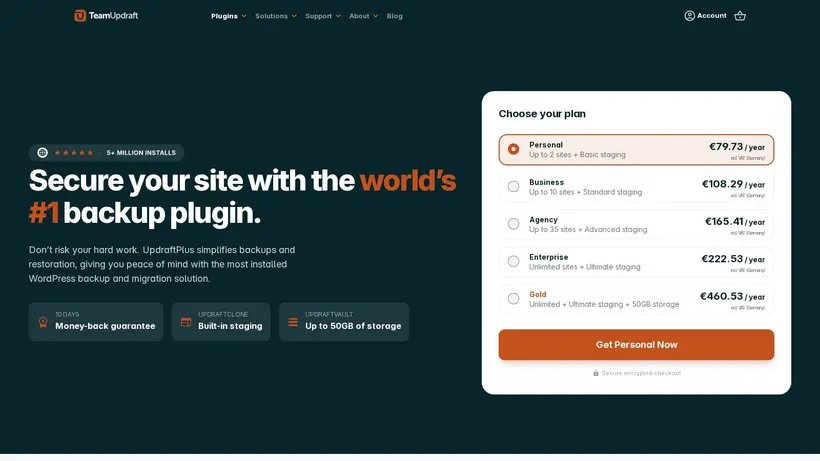
When looking at the available listings on our page, you will find options ranging from percentage discounts to fixed price offersfor specific tiers. For instance, the Personal plan covers up to two sites and includes basic staging, while the Enterprise plan supports unlimited sites with ultimate stagingcapabilities. By matching your project scale to the correct tier, you avoid paying for unused licenses while ensuring your backup schedule runs smoothly before every core orplugin update.
How our Save 20% OffWordPress Backup Software listing can help shoppers
Choosing the right backup tool oftencomes down to balancing cost with essential features like incremental backups and multi-cloud storage. Our listing for the Save 20% OffWordPress Backup Software providesa practical starting point for users looking to secure their sites. The crawled source indicates that the brand includes a 10-day money-back guarantee ontheir plans, which gives you a safety net to test the software. If you are running a small business, upgrading to a Premium Business plan withinthe first few weeks can yield significant savings, as shown in our compiled offers. Our editors keep these details updated so you can compare the active promotions side by sidebefore making a final decision.
Imagine standing at the checkout screen, wondering if you should buy the Personal plan for €79.73or step up to the Business plan. A quick look at our curated listings helps clarify which tier currently has the best promotional support. For example, if you manage client sites, the Developer or Agency plans might offer better long-term value than buying multiple individual licenses. We display these options clearly so you can weigh the upfrontcost against the license limits, ensuring you do not get stuck with insufficient backup storage or staging limits.
When to compare 20% off beforecheckout
Before you copy the coupon code and head to the checkout page, take a moment to review the specific termsof the promotion. Some offers apply only to upgrades within a specific timeframe, such as twelve or twenty-six weeks after starting a basic plan. If youapply a code for a premium upgrade, make sure your cart reflects the discount before entering your payment details. The brand states that renewal pricing may differ from the initial checkout price, so itis wise to plan your budget around the standard subscription terms. Checking the final total helps prevent unexpected charges on your statement.
It is also helpful to compare the premium features against the free version of the plugin. While the free version allowsbasic scheduled backups, the premium tiers add critical capabilities like automatic backups before updates, database table selection, and advanced retention rules. If your site handles frequent transactions oruser registrations, upgrading with a verified discount ensures you get these enterprise-grade features at a lower price. Our page lists the current active promotions tohelp you make this transition smoothly and securely.
Frequently asked questions about UpdraftPlus
Finding the right backup solution for your WordPress site is easier when you understand the pricing and features available. Our editors have compiled answers to common questions about savingon UpdraftPlus subscriptions. We monitor active listings to help you navigate the checkout process and choose the best plan for your needs.Whether you are looking for a free version or a premium plan with advanced staging, these details will help you make an informed decision before purchasing.
Does the provideroffer a money-back guarantee?
What plans are available for multiple sites?
Is there a free versionof the plugin?
How do I apply a discount code?
Can I upgrade my existing plan later?





